Adapting A.I. Servers to Suit Users’ Needs

As I continue to study my experimental home R&D A.I. server (https://ai.sauer.studio/), users of the system keep asking it questions that would be much better suited to search engines — such as, for instance, the open hours of a local business. My system wasn’t designed to answer those sorts of questions; I’m running a locally-hosted LLM, one much smaller (and therefore more environmentally sustainable) than those of Anthropic Claude, or ChatGPT, or Google Gemini. But I’m upset by my realization that users really don’t know how to use an A.I. effectively.
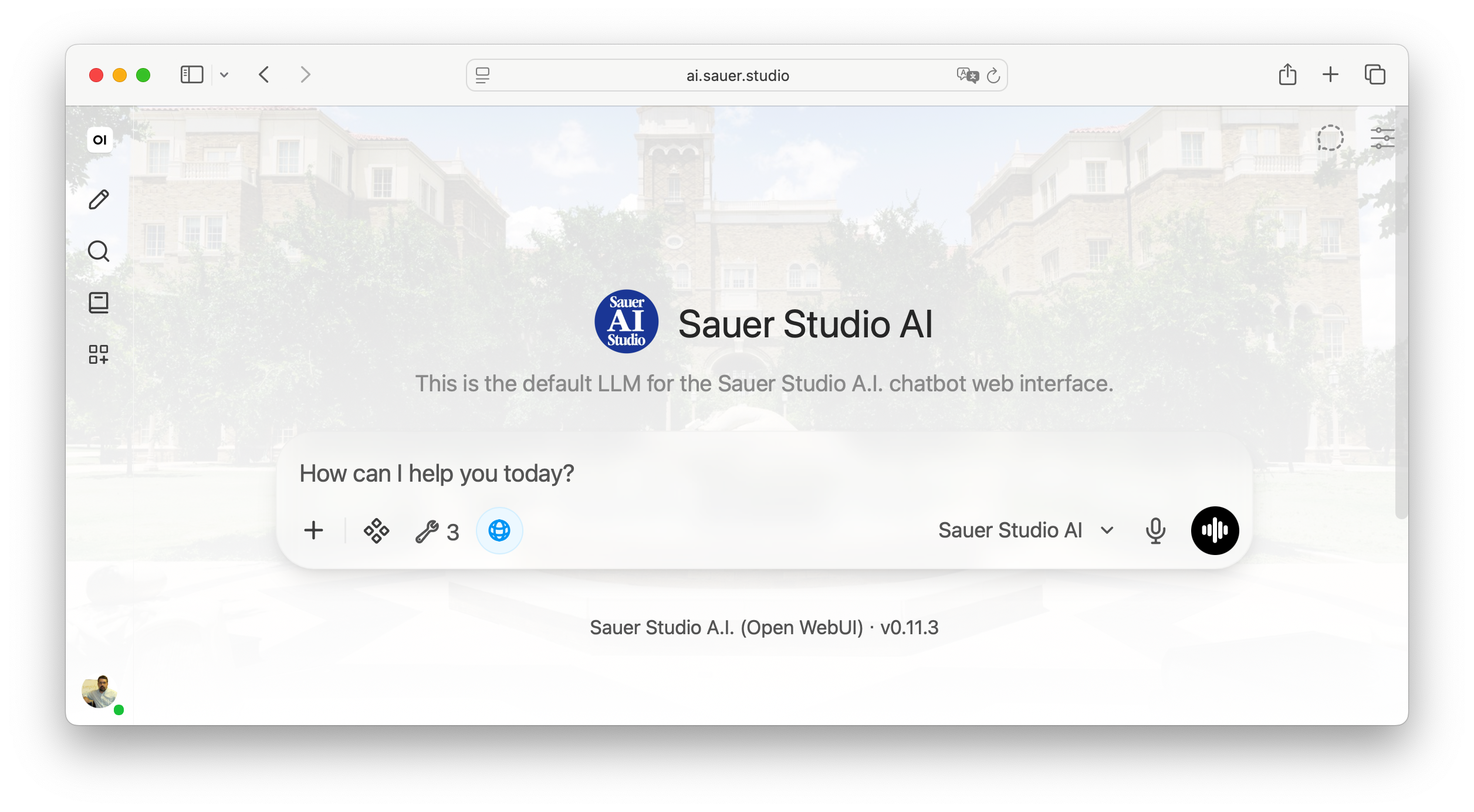
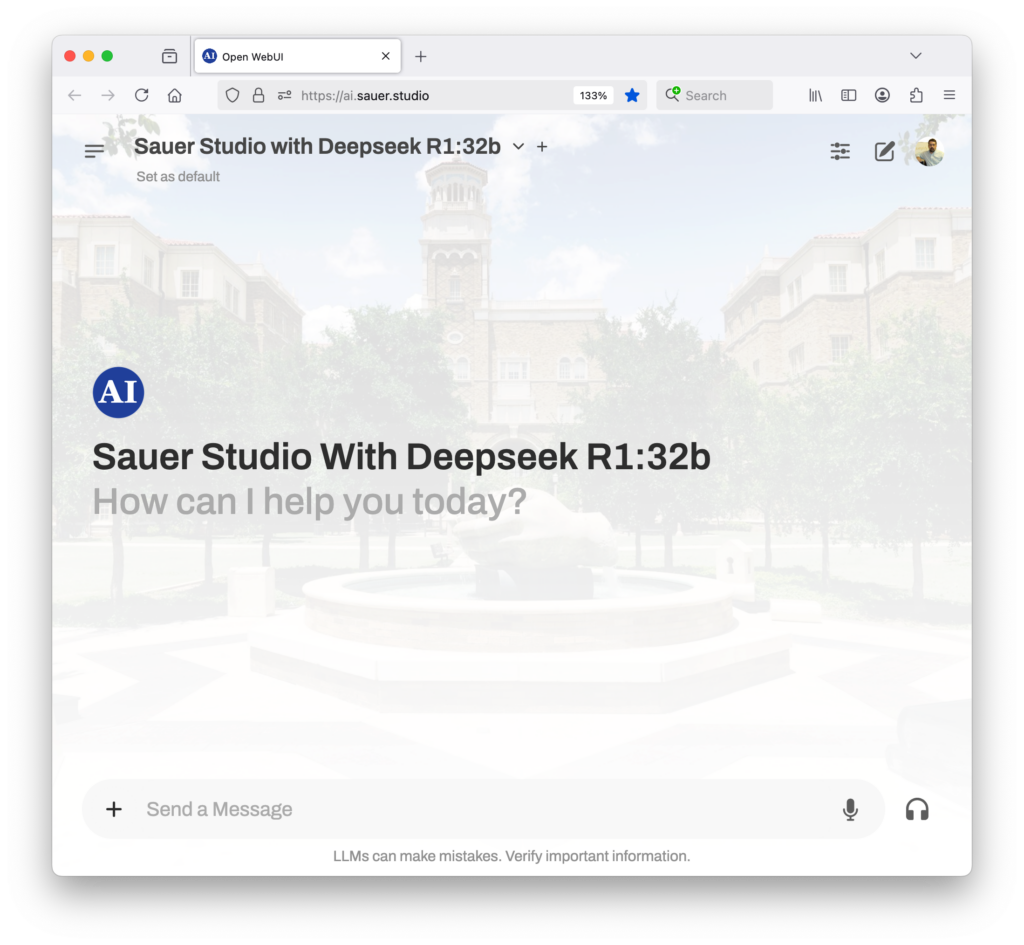
Sauer Studio A.I. website screen shot

I’ve studied A.I.s in depth in the past few years, and so I know well that A.I.s are more like “little Wikipedias” than “Googles.” They are built upon a collection of documents (generally at a relatively introductory level, and often at least a year out of date—sometimes more). So they’re not good at detailed expertise, local, or time-sensitive queries. Even the largest generative AIs (which support trillions of parameters, whereas ours consists of only 27 billion) aren’t great at such prompts. Asking “wrong” questions — such as news about the U.S./Iran war, or information about local venues, or details about people who aren’t famous — increases the likelihood of hallucination (incorrect answers), enormously.

Ursula Le Guin, in her 1969 novel The Left Hand of Darkness, has a wise character explain to our narrator “the perfect uselessness of knowing the answer to the wrong question.” I believe there is great wisdom in understanding what and how to ask a source, when researching (as my friends in ‘prompt engineering’ have studied for a while). It means, often, knowing how to best use tools. Le Guin’s novel points out something reflected in my own experience, from decades of library and archival research — no matter how much we might want a single all-encompassing knowledge source, that’s not how real knowledges usually operate. That’s why I trust my university library’s several hundred specific research databases more than Google Scholar.

Robert Pirsig, in his 1974 fictionalized autobiography Zen and the Art of Motorcycle Maintenance raises a similar concept, when he discusses “Mu,” a term he takes from Zen Buddhism. In his telling, “Mu” is an answer designed to negate a bad question. It isn’t a “yes” or a “no,” he argues, but instead a pointed rejection of implicit assumptions within a question itself. He suggests we should all think about answering some questions that way; this week, I wish generative A.I.s were able to do that. I often believe literature contains wisdom I wish 2026 users of generative A.I. had more easily at hand.

But (and here’s the difficulty of building server technologies). It’s easier to change my server, than to change people. (People don’t want to change.) You can tell this by the fact that Le Guin’s and Pirsig’s books aren’t widely read today, and that their contributions, though perhaps recognized five decades ago, haven’t become central to our thinking today.

So. After considering the problem for a while, I decided that I probably should just add a full Internet search engine to the little Linux server I keep in my home laundry room.

I needed my own Google — sort of.

So this morning, I built one. It took about half an hour to launch a comprehensive Internet search engine.

(If that sounds difficult, you should really read about how amazing modern open source containerization technologies are.)
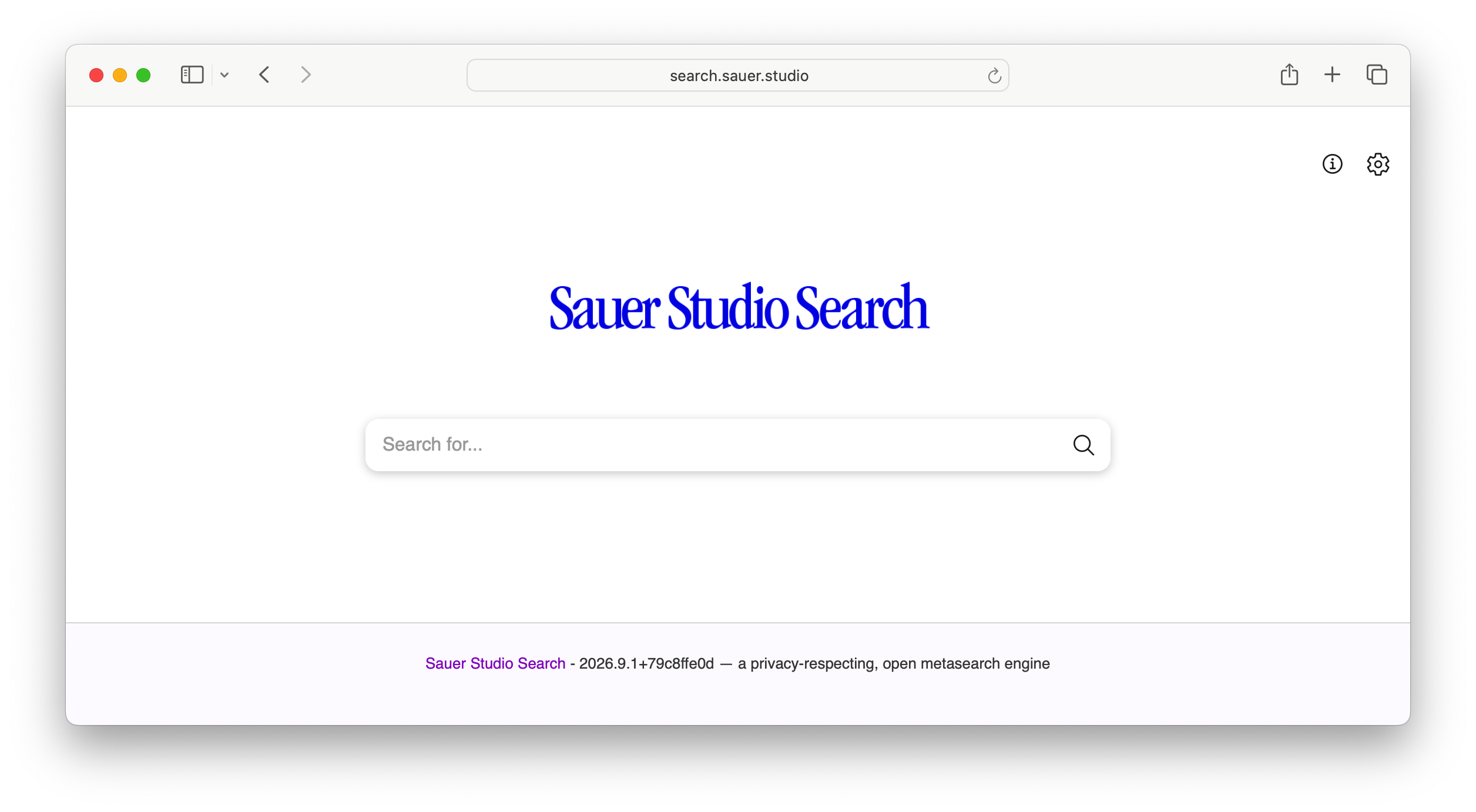
Sauer Studio Search website screen shot

I couldn’t just have my A.I. rely on search APIs offered by Google, DuckDuckGo, Bing, or Wikipedia. Those organizations provide limited access to users, but a local AI needs lots of access — more than companies generally offer to rivals (even small ones, such as my own little site). My site could negotiate long-term contracts with existing search engines, paying monthly fees for our usage. But I didn’t want that. I’d rather run my own search engine; that’s part of the whole point of locally-hosted servers.

So I’ve launched “Sauer Studio Search,” as I call it (at https://search.sauer.studio/). It really only took a half-hour to launch, since it’s just an implementation on Linux/Docker of the open source metasearch system SearXNG. (When you understand modern cloud computing and know the rich, open source ecosystem to stand upon the shoulders of, this sort of thing is easier than it sounds.)

I then connected Sauer Studio A.I. to this search engine, and turned on my Open-WebUI server’s “Web Search” feature, to consult my local search engine, by default. Now, when you ask my A.I. a question about any topic, when the internal LLM decides that it doesn’t know enough about a user’s query, it will search Internet web pages, read top ten results, and use the information from those pages to inform its answers.

This will fundamentally transform Sauer Search A.I., from a small, local knowledge base to one informed by the entire Web. (I just searched the A.I. for information about a small, family-owned doughnut shop near my neighborhood high school, and it answered well.) But I wish that our users understood the implications of such a setting. Web Search will lower my A.I.s use of specific, detailed, local knowledge bases in its answers (it may prefer general information from the Internet). And such settings are important to every research tool in the modern world. I make this choice hesitantly, but it seems the better way to cope with users who ask “bad questions.” I think this will allow people who try my system to get answers more in keeping with those from corporate frontier genAIs. I wish I could teach users, as bibliographic instruction specialists at research libraries used to; but so far, people just want everything in one place. As unwise as that may be.

I should be clear that I’m not trying to “shame” any users. I don’t think the behaviors I’m seeing among A.I. users come from laziness or sloppiness, or any personal failing of individuals. Instead, the issue comes from larger social knowledge about generative A.I.s, their internal knowledge ideologies, and how they connect to information repositories. I think we should work, as a field, to improve that general understanding, by educating everyone, as generative A.I.s become more widespread.

I will work to customize the search engine over the next few weeks, adjusting the sources it consults for answers. All search engines have ideologies — those of you who know me in person have heard diatribes against choices like those made by Google. This one will have impeccable privacy for users. It will show “Lake Ontario” on its map (to follow International Hydrographic Organization Technical Resolution A.4.2.6. and the United Nations Resolution on the Standardization of Geographical Names guidelines). And in the process, I’ll learn more practically how the ‘guts’ inside modern Internet search engines really work.
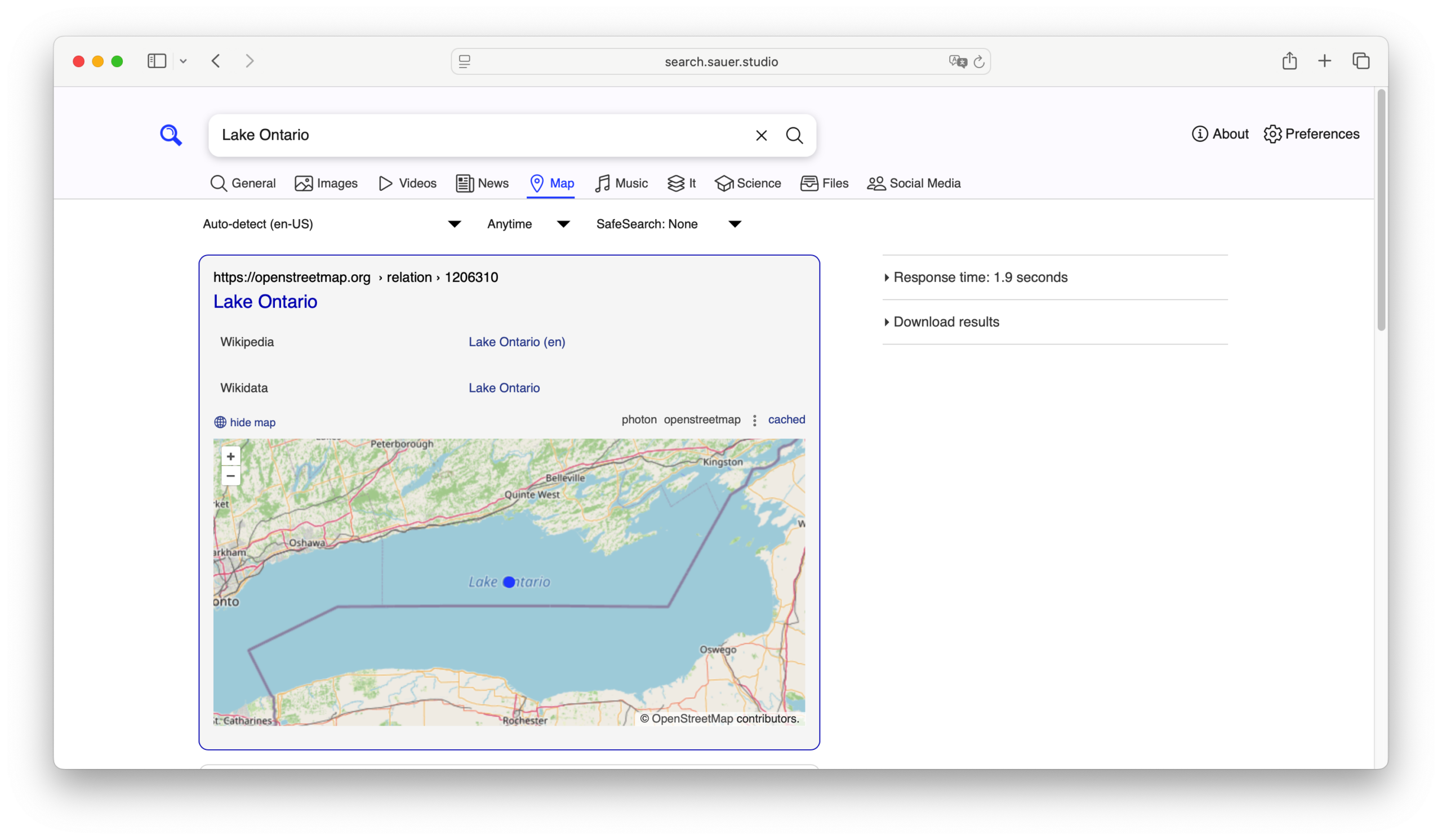
Sauer Studio Search website map of Lake Ontario screen shot

You can give it a try, if you want. https://search.sauer.studio/. (It seems to be working nicely.) And if you use Sauer Studio A.I., it now can search the Internet when it suspects its internal knowledge base isn’t complete.

So. Win win? In a way. Sort of.

A Sleepless Night from Generative A.I.

Geoff, his head on his keyboard, miserable.

So. I had a difficult weekend, working on a collaborative research project using an open-source generative A.I. server I’ve built with a small research team (https://ai.sauer.studio/) in the laundry room of my house.

Today, I seem to have dug myself out of the hole? I survived, and I’ve learned something from the experience.

Those of you who read my posts know that I’ve been generally very pleased by open-source generative A.I. LLM systems. I’ve been convinced that they’re an excellent alternative to soulless environment-destroying, intellectual-property-abusing, mediocrity-inspiring, and prosaic corporate generative A.I.s.

I have been upset since last Friday, however, when I discovered that my own prototype alternative system wasn’t as smart as I’d thought.

It was having trouble parsing some actual student prompts, gathered during a usability-testing session run by a colleague and friend. The system just provided incorrect, incomplete answers to one of the student questions. In thirty variants of LLM and temperature settings, almost none of the system’s answers was substantially correct.

Sigh.

As a result, I didn’t sleep well on Friday night. I’m collaborating with teammates on this research, and we’d committed six months already to this technology. If it didn’t work, we could still report negative results, but I didn’t want to. The system had worked so well, at first. I feared I’d be letting my entire team down.

I was unhappy-worried.

TL;DR

Problem: Open‑WebUI’s default RAG setup gave spotty answers for graduate‑student queries about the TTU English Graduate Handbook.

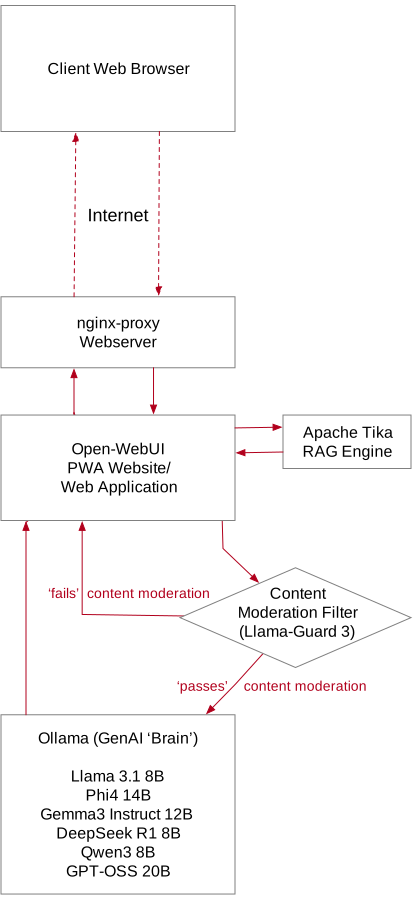
Fix: I swapped the default RAG retriever for Apache Tika, bumped the retrieval top‑K from 4 to 10, and crafted a longer, more detailed RAG engine prompt.

Result: Accuracy jumps from “slightly useful” to “highly reliable” for real‑world student questions.

The Context: Why RAG Matters for Students

Graduate students often need quick, reliable answers to procedural questions—deadlines, funding policies, coursework requirements. I have found in recent years, at two universities, that PDF handbooks do not tend to be understood very well by graduate students; they’re just not confident that they understand the system which governs them. I’d theorized (widely, on social media) that a small, free, open-source LLM backed by Retrieval‑Augmented Generation (RAG) could pull up‑to‑date information from institutional documents, making the model a friend who answers any question they have, behaving like a living FAQ. 

Open‑WebUI is a popular open‑source front‑end that bundles a powerful LLM (e.g., ChatGPT‑like) with a simple RAG pipeline. By default, it uses a lightweight retriever and a modest top‑K of 4 passages. That works great for general knowledge, but when you ask the system to pull from a specialized, dense text like the TTU English Graduate Handbook, my research team and I found the answers begin to drift. The LLM can especially be distracted by errant words, spelling errors, and grammatical errors in the users’ prompts.

The Symptom: Inexact Answers

When I ran a test suite of actual graduate‑student prompts—things with unclear elements, spelling and grammar errors, such as “Does Texas Tech’s PhD Program in Technical Communication and Rhetoric give a sequence of exams and [sic] to receive the degree and what are the consequences if these milestones are not met?” the default Open‑WebUI configuration produced responses that were nearly correct but often missed key details about the third-year qualifying exam (the only event marked in the text as an exam).

Why? 

Sparse Retrieval – The default retriever (a simple TF-IDF and BM25) only fetched 4 passages (the default “top K” setting). The Handbook is long; the relevant snippet can be buried among many others.

Shallow Prompt – The prompt given to the language model was short, lacking explicit instructions to synthesize information from the retrieved passages.

Engine Limitations – The default embedding model wasn’t tuned for legal or procedural text, so the ranking was sub‑optimal.

The Fix: A Three‑Step Customization

Replace the Default Retriever with Apache Tika

As I lay in bed, sleepless (I’d spent six months on this prototype!), I remembered a conversation with an expert who’d been very dissatisfied themselves a few months ago with the Open-WebUI RAG settings.

I remembered, from that conversation, that Apache’s open-source Tika is a more robust content extraction framework that can parse PDFs, Word docs, and many other formats, converting them into a format easily accessible by the LLM’s vector databases. On Saturday, by adding a Tika container to the same Docker network as the Open-WebUI frontend, then re-feeding Tika‑cleaned PDF documents into the embedding pipeline, I was able to reduce noise and improve retrieval quality significantly.

Adding to the RAG Top K

Retrieving more passages also gives the language model a richer context pool. So I adjusted the RAG parser’s top‑K from the default value (4) to 10. This consumed more high-speed RAM (as did the Tika container), but now the model can cross‑check facts across multiple snippets, reducing hallucination still further.

Adjusting the RAG System Prompt

I also lengthened the system prompt Open-WebUI uses when engaging with RAG content, adding details to its default text to ensure that it considers the source PDFs more carefully.

After deploying the above changes, I reran the same graduate‑student prompts. Amazingly, it worked!

(You aren’t likely to be amazed. You’re probably either not understanding this technical jargon at all, or you understand it so well you’re shaking your head that I didn’t think of it right away. But I’m sharing the level of expertise I have, without shame, hoping it can help those who haven’t faced quite this problem to benefit without any need for your worry.)

After this fix, the model consistently cited the correct passage, reducing its guessing.

My team and I will spend the next few weeks coding several hundred AI-generated answers to student prompts, but I’m now much more confident in our system’s ability to help students. (And I’m sleeping better!)

Take‑Away Tips

Document Pre‑Processing Matters – If you’re using an open-source LLM server, consider adding a robust parser (Tika, PyMuPDF) to clean PDFs before embedding.

Top‑K is a Trade‑off – 10 is a sweet spot for medium‑sized handbooks; adjust based on document size and latency tolerance. 

Prompt Engineering is Important – Explicit instructions in the RAG system prompt drastically improve answer quality.

Iterate with Real Users – When building any open-source LLM solution, always test with actual student queries, then don’t be afraid to refine the system’s settings, based on feedback. It may take more fine-tuning than most English faculty are used to — but we live in a new world, and debugging scholarly tools isn’t entirely unlike revising our scholarly writing.

Conclusions

Open‑WebUI is a powerful foundation for building an institutional FAQ system, but the default RAG pipeline isn’t always “plug‑and‑play” for specialized documents like graduate handbooks. By swapping in Apache Tika, increasing the top‑K to 10, and giving the RAG engine a clearer, longer prompt, it may be possible to transform a “good enough” assistant into a trusted resource for your student community.

But thinking back on the experience, I remember how dismissive I’d been of the conversation with a colleague a few months ago, when they’d reported issues with the default RAG engine. It worked fine for me, didn’t it?

I see, now, that I’d not wanted to consider my colleague’s experiences, in part because I was afraid I’d have to do the complex work of adjusting the server containerization, and add an additional piece of software into the complex flowchart of how my system already worked. That led me not to want to consider their story.

But best practices don’t result from what I want. They come from consistent, quality results.

It was only later, reflecting on why I was facing failure, that I considered properly what my colleague had said. It was then that I needed to remember, in detail, the complex solution they had described solved the issue for them. Today I thank goodness I’d not let my fear of their experience cause me to “zone out” as they spoke; because I paid attention at the time to the details of their solution, even if I doubted it applied to me, I was able to recognize its significance when I needed to. Later, I realized it really, really did apply to my case. Only because I’d been lucky, paying attention to a newly-emerging community of experts, could I possibly have solved this problem.

Now we’ll be able to complete our study, report very positive findings at the SIGDOC conference next month, and write our results for peer-reviewed publication.

Happy building—and may your graduate students always find the answers they need!

Travails

Over the past three weeks, I encountered several technical challenges while working on my Sauer Studio A.I. project. If you haven’t read my earlier posts, in 2024 I created an open-source generative AI server to support my research, because the largest number of existing genAI servers today this sort of setup (though most published research has focused on cloud-based services like ChatGPT, Claude, or Gemini). Too few people are even aware of how capable open-source alternatives already are, I feared.

Exploring the Open-WebUI Interface

As part of my studies, I experimented with various settings in the Open-WebUI front-end web server, to optimize my genAI models’ performance. These included:

  • Turning administrative features on and off, such as “Tags Generation,” “Autocomplete Generation,” “Retrieval Query Generation,” and “Web Search Query Generation.”
  • Adjusting model parameters like context size (short-term memory), temperature (creativity level), and max_tokens (response deliberation time).
  • Upgrading the Open-WebUI application multiple times.
  • Testing whether allowing the genAI to search the internet or preload specific documentation sets would improve results.

Performance Decline and Troubleshooting

Despite these efforts, the system’s performance deteriorated over time. Responses became increasingly slow, and answers to previously correct questions became vague and less specific. I tried numerous fixes:

  • Disabling the Content Moderation Filter.
  • Adjusting context window sizes and token settings.
  • Reinstalling older versions of Open-WebUI.

Nothing worked. I felt discouraged, questioning whether the system had ever performed as well as I initially believed.

Additional Setbacks

At the same time, my open-source Certbot (which generates SSL certificates for my websites) crashed without clear error messages, affecting all sauer.studio domains. Coupled with disturbing national news, I was tempted to doubt myself entirely, including my ability to manage a modern container-based AI server (even after 30 years of web hosting experience).

I felt overwhelmed. I felt guilty about this failure’s implications for my first research study’s coauthors, and for the 28 scholars worldwide who’d created accounts on Sauer Studio A.I.

Solution Found

After reinstalling the newer Open-WebUI version and extensive research, I finally resolved the issue by turning off the four administrative settings mentioned at the top of this post. This restored the system’s performance, and I quickly fixed the SSL certificate problem as well. Now, everything runs smoothly, just in time for user testing.

Lessons Learned

This experience coould teach me one of two lessons:

  • Perhaps it’s better to use established cloud-based services like ChatGPT instead of building local alternatives. While this approach may have ethical concerns and limited customization options, it would probably offer stability.

or

  • Academics need to thoroughly explore AI server settings and configurations before publishing research. Hands-on experimentation is crucial for understanding these technologies fully.

Future Plans

I’ve chosen the second lesson as my guiding principle. I believe that mastering new technologies requires extensive exploration of their underlying infrastructure. Moving forward, I plan to enhance our project with more resources and personnel. It’s only through trial and error that I now truly grasp concepts like “tags generation” or “retrieval query generation.” This hands-on approach has deepened my understanding of LLM genAI technology.

I suspect all scholars who study generative A.I.s would do well to spend detailed time learning everything we can about these technologies, so we’ll be able as a community to help our discipline think about how to professionalize any widespread use of emerging technologies like these.

Building a Generative A.I.

Building an experimental Generative AI server this summer has been fascinating. As of this week, 16 people are using it. Over the summer, I’ve fine-tuned it quite a bit, and it’s much smarter now than it was when we began.

I still believe these systems are mediocre writers, and a genuine threat to student learning about writing and coding. But I now understand their workings in detail, and am ready to research how universities ought to employ this tech in the near future.
Just ignoring them (or reading Atlantic articles) isn’t a good plan. Though there is absolutely an AI “bubble”/media fad, LLMs are nevertheless real technology. They won’t go away. Just pretending our students won’t use them is naïve.

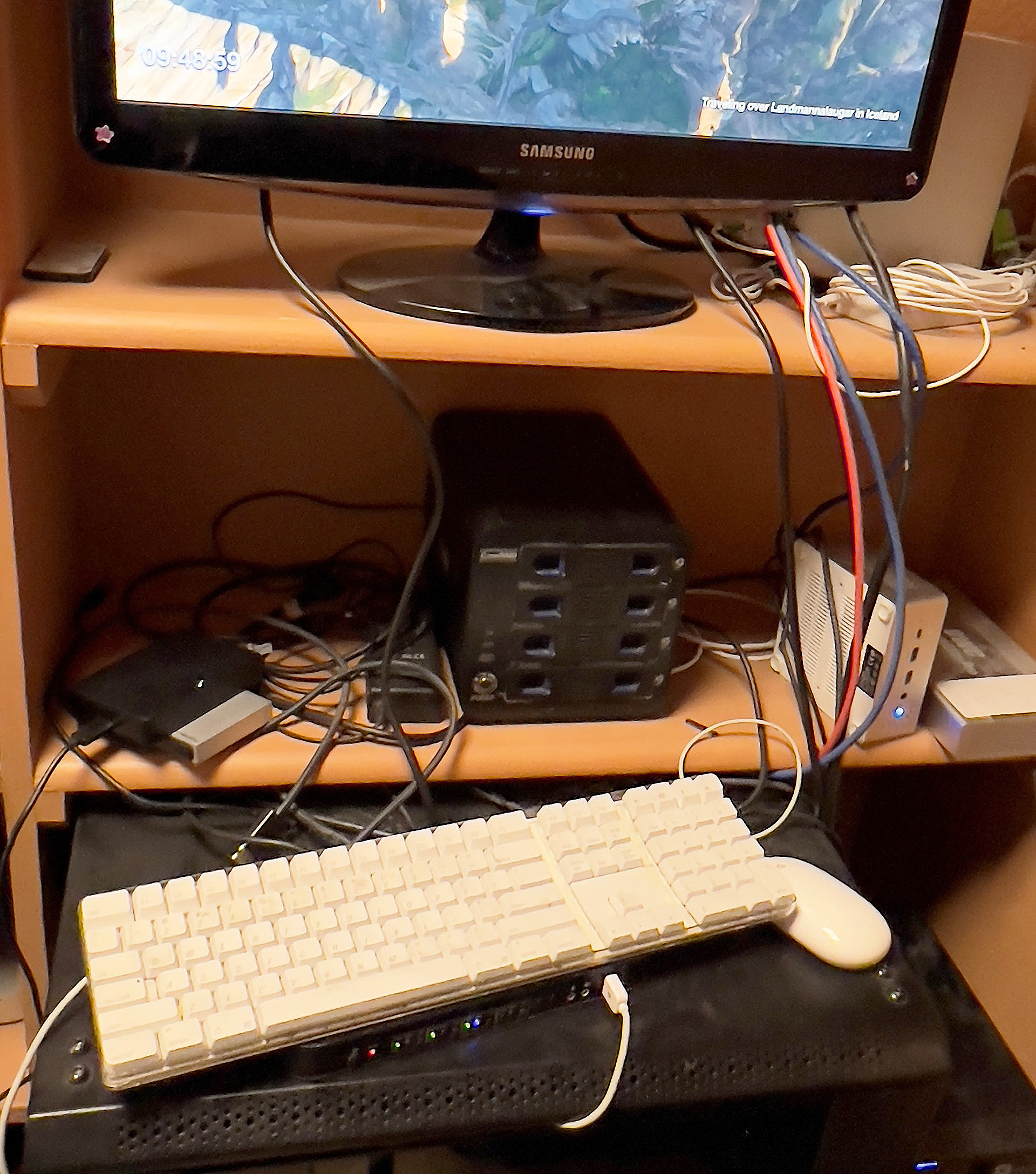
However, I need to clean up the aluminum-foil-and-chewing-gum apparatus I built in my laundry room to run this, as I transition toward a more substantial AI server setup, one based on this proof-of-concept.
So: if you haven’t tried it yet, please feel free to sign up. But I’ll now plan a replacement future system, run directly from the Texas Tech English Media Lab this fall:
https://ai.sauer.studio/


(Click the ‘sign up’ link below the login form to make an account. Use your real name and email, and I’ll activate you.)

So. I broke my AI server yesterday.
Destroyed it, really—with punctuation marks.
Greek myths had taught me, when I was young, about the danger of hubris. Forgetting that lesson, in a moment of excitement, I decided to try something fancy with the ‘config.py’ file on my experimental site.
And I broke it. Completely. Because of a syntax error in the Python code, it wouldn’t restart without crashing, every time. And it would crash each time before I could remove my edits from the .py file. Damn! It was almost certainly just a misplaced quotation mark or semicolon.

Luckily, we live in a world of containerization. I find Docker to be indefensibly badly documented and far too difficult to configure and use, but it does have some advantages when you set it up correctly.

I had a complete ‘snapshot’ of my AI server, from just hours before. Though I didn’t have the energy last night to do the command-line work necessary to restore it, this morning I got a cup of coffee, restored the backup, and https://ai.sauer.studio is now running again, exactly as it had been yesterday morning. Zero data lost—just some downtime. (Sorry to anyone annoyed by the outage.)
And I suppose I’ve learned a lesson?
At least I’ve been reminded of one I had already learned.

Here are some of the questions I’ve been trying with my experimental A.I. this week, as I work to create a usable chat interface to graduate student handbooks (and other large documentation sets). Note how it provides citations, with links to the source PDFs. And it’s all locally hosted and fully open-source! No corporate servers needed.

It looks promising! My early adjustments to the model’s ‘context’ and ‘temperature’ seem to generate usable answers. The lower temperature has meant no hallucinations, so far!

Next steps: IRB approval, then empirical, quantitative, replicable research with real users. And possibly—funding for a faster, more capable server?

EXAMPLES:

Q: When do I take my qualifying exams?
A: According to the documentation, students typically prepare for the Qualifying Exam in the spring and summer of their second year. The exam preparation will be fully focused on mastery of the lists and the selected fields, including the more specialized one leading to the dissertation.
The written exams are usually taken during the fifth semester.
Q: How do I add an outside committee member to my PhD committee?
A: According to the provided documentation, it is recommended that you consult with your chair and contact the DGS (Departmental Graduate Studies) office to update the appropriate records if you decide to bring in an outside reviewer or change your committee.

To add an outside committee member, follow these steps:

  1. Discuss with your chair: Share with your chair the reasons why you believe an external reader would be beneficial for your dissertation research.
  2. Identify potential candidates: Look for graduate faculty members from other departments who have expertise relevant to your research area.
  3. Obtain approval from the DGS office: Inform the DGS office of your intention to add an outside committee member and provide any necessary documentation, such as a brief explanation of why you think this would be beneficial.
    Please note that the department encourages outside members to serve on dissertation committees if it is deemed necessary for the research. However, ultimately, the decision to add an outside committee member should be made in consultation with your chair and the DGS office.
    If you have any further questions or concerns, please don’t hesitate to ask!
    Q: What can you tell me about the MATC portfolio?
    A: According to the provided context (documentation), the MATC portfolio is a digital portfolio that represents your work in the field of technical communication. It’s a three-fold audience and purpose, which means it serves as a professional conversation starter for potential employers or industries you want to enter, while also being assessed by your capstone course instructor and an ad hoc committee of TCR faculty.
    The MATC portfolio is a requirement for the Master of Arts in Technical Communication (MATC) program.

Do all of you get as embarrassed as I do, watching your first day of teaching as you prepare for class day two, and reading the transcript from the video? #embarrassing
I understand why it’s a good idea; I make my students watch their own presentations because it’s really helpful for them. And the notes I take rewatching last class always makes my next class better, but #bestpractices aren’t always easy.
I’m not sharing the full video or .vtt file here (that’s just for the students and me), but here’s the PowerPoint slideshow for ENGL 4367/5373 (Instructional Design for Technical Communicators), if you’re curious:

https://geoff.sauer.studio/wp-content/podcasts/engl_4367+5373_first_day_slideshow.pdf

California’s SB 1047 is a clear example of why (1) we need better laws about technology in this country, and (2) our current legislators are incompetent at writing them.
This proposed law (which passed the Assembly, and may pass the California Senate tomorrow) would make open-source AI technologies stupidly expensive, and subject to fines for what end users do with them (much later). It’s a clear example of how one should not write technology public policy.
Here’s hoping it fails tomorrow, or that Governor Newsom doesn’t sign it into law. It would certainly hamper my research.

So. You know I’ve been looking at how my GenAI ( https://ai.sauer.studio/ ) can help users get information they need from instruction manuals.
This week saw exciting new LLM models, like Hermes 3 (which has notable skill with languages). Working over the weekend, I loaded the handbooks of Texas Tech’s TCR in-person and online MA and PhD programs, told the new model to speak to me first in English, then French, Yorùbá (a language from southern Nigeria), and Hindi.
I asked it to answer questions about the graduate programs in those languages. It first reads the manuals (written solely in English). Then it generates clear, correct summary answers to questions in those languages, providing hypertext links to the correct pages in the source documents.
This promises to improve the user experience of documentation quite a bit for audiences with limited language skills.
My French is passable; I had to use machine translation for the Yorùbá and Hindi. But according to my tests this weekend, this system can actually work. It’s better in French and Yorùbá than Hindi, but that’s a result of the relatively small Hermes 3 model I’m using here (with funding, I’ll be able to run larger LLM models, and perhaps achieve results which will lead to clear recommendations for industry and the academy). Next for testing: Spanish and Mandarin.
None of this has any cost, except for medium-capacity computers (I’m running on a MacBook Pro)—and the expertise. (The software is all free and open-source). It’s very expensive (in time / expertise) to build the first one, but much faster for the second and third, and easy after that.) Having faculty in Tech Comm learn this expertise ourselves, will, I think, be time well-invested. Avoiding OpenAI (GPT) and Anthropic (Claude) seems to be worth its weight in gold, given the problems everyone’s reporting with those systems. And it’s cheaper this way!
I’m excited to work with two colleagues (Bremen Vance and Guiseppe Getto) to explore how fine-tuning models will help technical communication develop ‘best practices’ for locally-hosted, open-source documentation assistants. We submitted our first scholarship on this topic last week. It’s exciting to explore real, practical uses for these emerging GenAI technologies which have heretofore been mostly ‘undisciplined.’

Teaching Rudimentary Coding in English Classes?

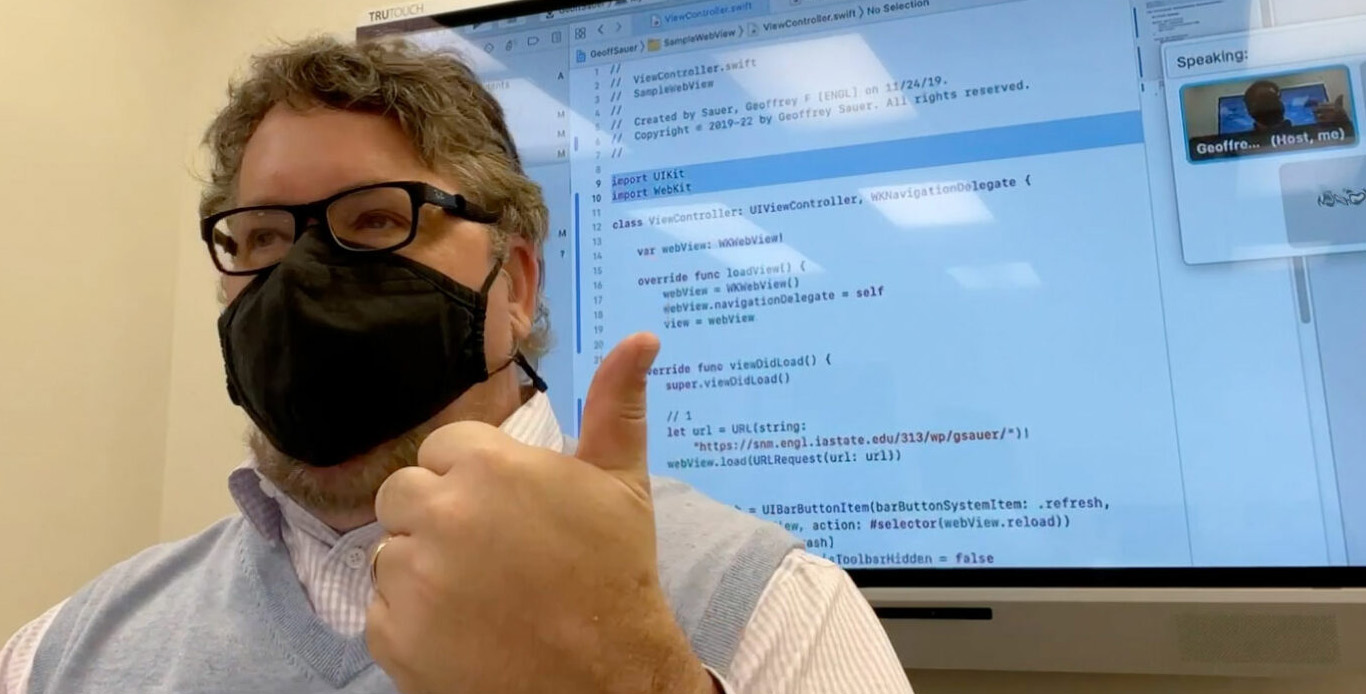
I’ll be teaching some basic Swift and Java coding in my 300-level ENGL intro to web design class tomorrow. The students have already been learning to build websites all term. After weeks with HTML, CSS, JavaScript, and frameworks such as Bootstrap, they’re understandably tired of the all coding they’ve already learned. And Swift and Java aren’t front-end web standards, as everything else we’ve studied this term is.

But. It’s worth showing them, at least.

Because this will allow my students to make the documents they’ve been writing and designing all semester (and in the future) into ‘apps’ for phones and tablets. The apps, when launched, load the students’ web documents or websites full-screen on mobile devices.

So it’s useful—if they can handle it. But I’m concerned about overwhelming them. I do get the clear sense that students in 2022 are especially scared of coding. Probably from the bizarrely neurotic ways coding are figured in popular culture.

But will this be too much for college juniors who haven’t ever studied code? They really only have to edit line 24 in each file, to put in their own website URL addresses, and probably want to replace the ‘Geoff’ icon with an icon of their own design. Then they’ll have to compile this code, using one or both of two (free) compiler applications they’ll have to install on their computers and learn to use. But if they can learn to use these templates, then they’ll be able to make a kind of mobile app called a ‘WebView’ app — basically a first entry into coding. And post those into the Apple, Google, and Amazon App Stores.

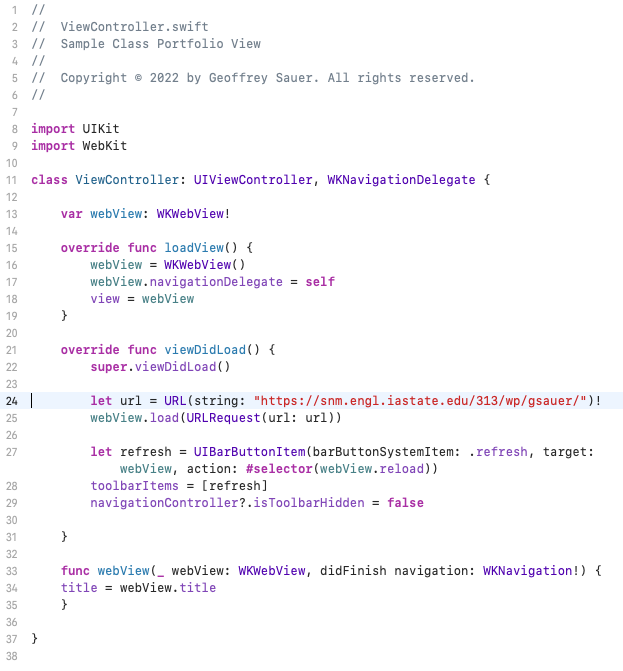
Here’s the code in Swift, in the XCode compiler (which only runs on MacOS):

This is Swift code to create an iOS app.

With the code above (written in the language Swift), they’ll be able to create an iOS app which could be submitted to the Apple App Store (it only takes about a minute), which would load their personal portfolio websites (or final class projects) on iPhones or iPads. Line 24 is the important line, which contains the website URL which should be loaded, full-screen, when the app is launched.

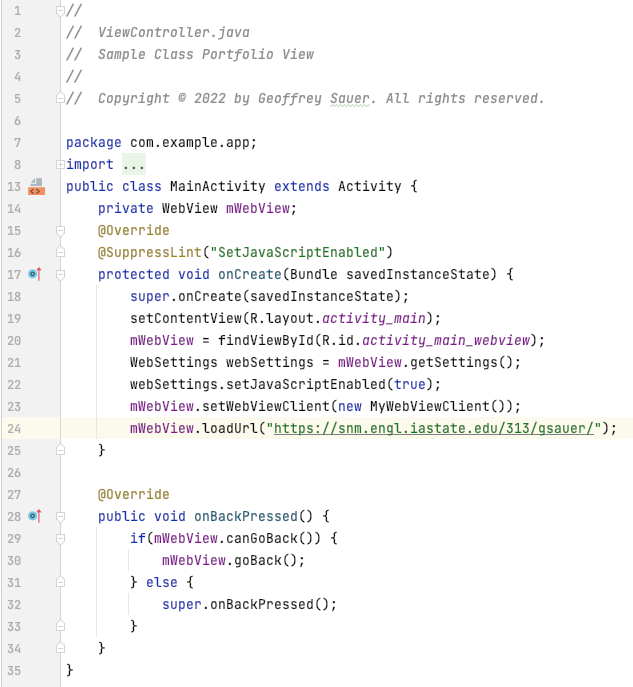
Here’s the corresponding code in the language Java, in Android Studio (which runs on Windows, Linux, and MacOS):

This is Java code to create an Android app.

With the second example, they’ll be able to compile an Android app which loads the web address they provide in a full-screen app on Android phones and tablets. Again, line 24 is the crucial one in this code. And basically, this is just what Twitter, Facebook, Instagram, and many social media apps do.

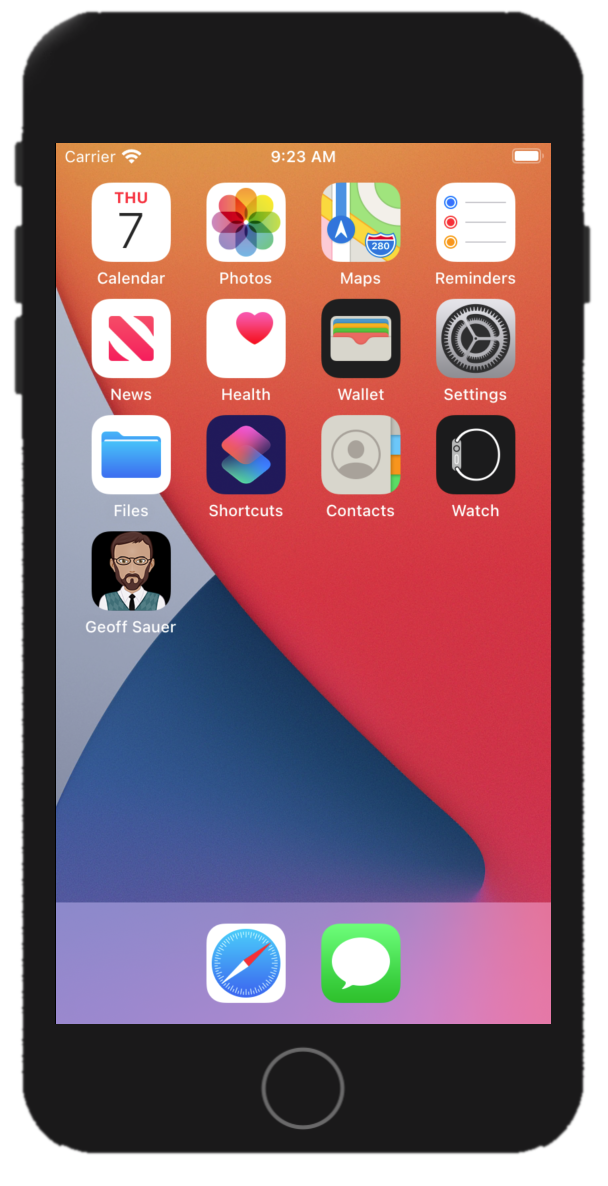
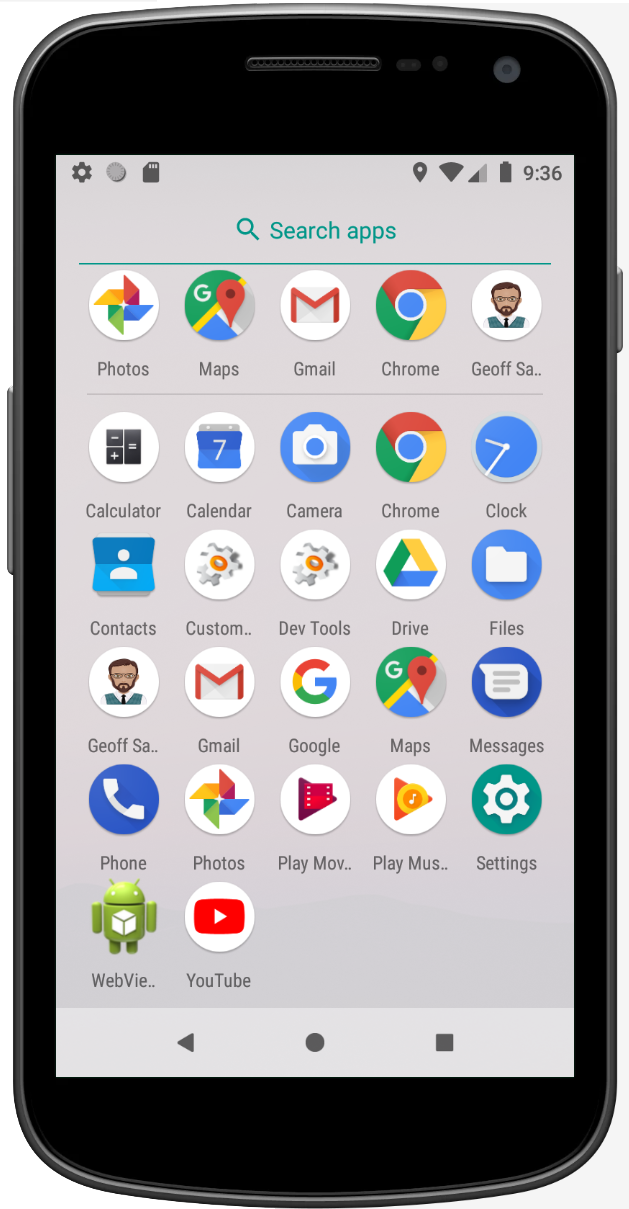
You can see this example ‘Geoff Sauer’ app now running in the images below:

This project would let each of us in the class make a “Geoff Sauer” app (or one with a student’s own name, or their service learning clients’ names). Clicking the “Geoff Sauer” icon opens this website, my personal site, as an app. It makes reading this blog something you could do daily (if you want).

While everything above may seem technical and complex and new, I quite believe this is a skill worth learning. Especially for students who work on service learning projects for deserving nonprofit clients, being able to deliver a complimentary and complementary app to the websites they’re already building can be very useful. (Even if students are hesitant to venture much into learning coding?)

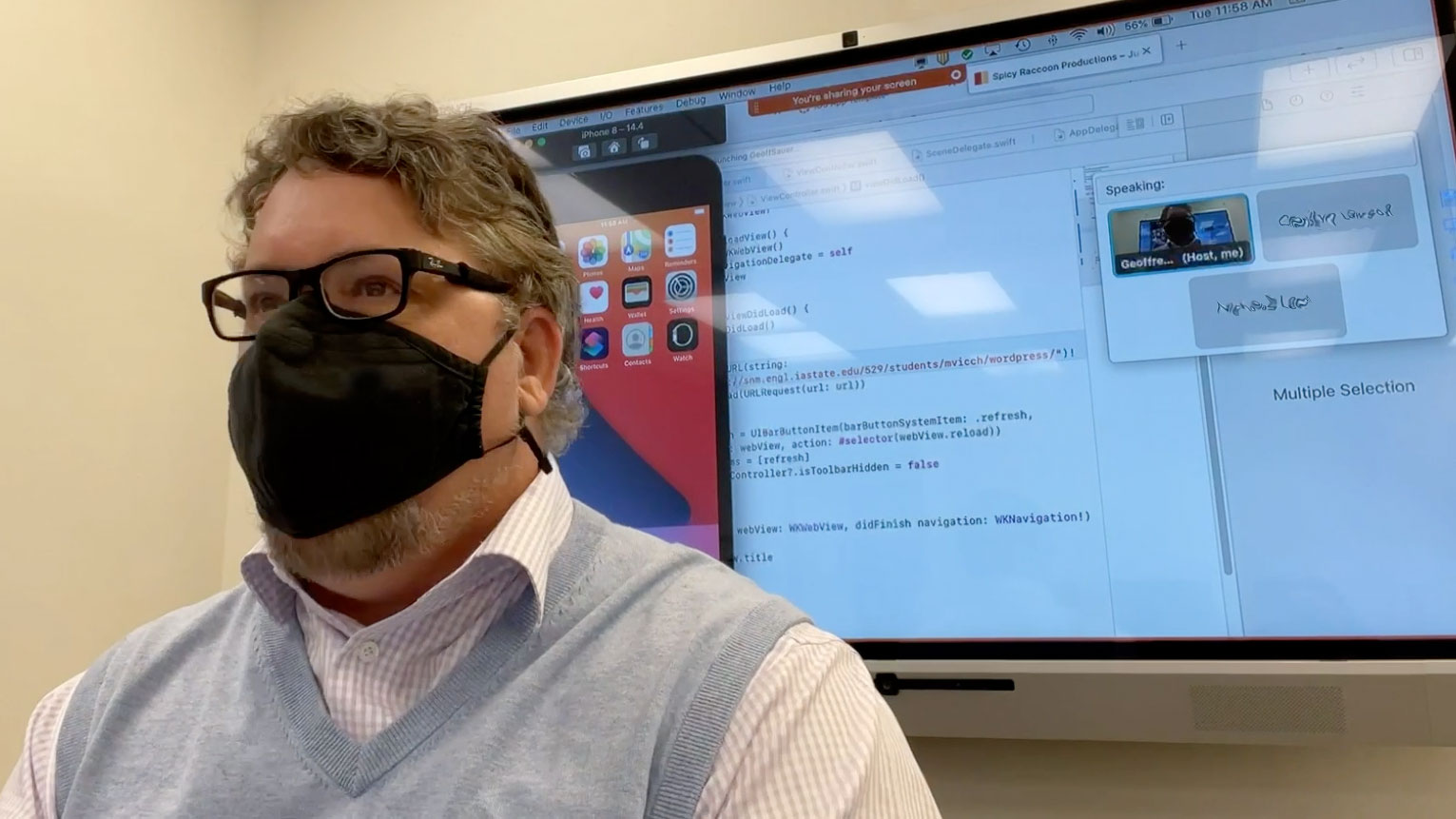
These screen shots, by the way, are emulated (virtual) iPhones (an iPhone 8) and Android phones (a Samsung Nexus). Did you know that computers can do that?

This is a virtual Samsung Nexus phone, with the "Geoff Sauer" app installed.

My students are always amazed when I show them their computers have virtual cellphones inside of them. (Especially when I get the computers to emulate newer and better cellphones than any of us actually own.) Doubly so when I point out the MacBook Air I teach with is from 2015, so they can certainly do it with their computers. Both XCode and Android Studio are completely free of charge, so the only thing stopping students from exploring this over the summer is their own time. Fun.

As you know, sometimes I’m asked why this is taught in an English class. I’ve written about this in the past. English departments in the U.S. have always taught students to produce culture: in the past, this has been poetry, novels, short fiction and creative nonfiction, of course. As well as the venerable persuasive essay. And all of those still exist. But I strongly believe that apps and websites are now a vital part of contemporary culture, and English students should be able to create 2022 culture, as well. Students often nod thoughtfully when I tell them that; no one’s ever been able to argue otherwise. But this is a duty of sorts, a responsibility—we shouldn’t leave cultural production solely to programmers. Those of us who call ourselves ‘creatives’ can code, too; coding just isn’t really very scary.

Or it shouldn’t be.

Being able to publish our own content in apps that can be circulated on the Apple or Google App Stores should help students in English departments, whom I strongly believe have amazing material to share with the world, feel more confident about the value of their work. It should, right? Is the needed coding worth the effort? Some of my students have picked up from someone—not their professors, I hope—a startlingly fierce resistance to learning applied technologies. Which I hope to overcome, at least a bit, in my classes. We’ll see.

(By the way, the XCode with Swift is a joy to work in, every time. The Android Studio using either Java or Kotlin is a nightmare, every time. Should I tell them that?)

I welcome your advice.

Why We Must Teach Web Design and Development in English Departments

I have taught web design and development since the early 1990s, as part of my work in rhetoric programs at three research universities. Over that period I have participated in (and even led) award-winning digital humanities projects, worked on W3C committees which defined the protocols and standards for web content, and directed websites which have hosted more than 2.5 billion ‘hits.’ But in this past year I have heard, more than ever, students asking why web design is being taught in an English department?

In this post, I will argue why this question, when we hear it, must be taken seriously—why students, colleagues, and administrators need to understand how academic programs in rhetoric are (and should be) central to online cultural production, and why the tacit but unsubtle insults within these queries represent a manifest danger to the fields of rhetoric and English as a whole.

I have developed several answers to this question, with different advantages for specific audiences. Here I will discuss three I keep handy for conversational use, the strengths and weaknesses of each, and will argue that as a field we should consider future research to develop both disciplinary and institutional ‘best practices’ for describing digital composition to people who don’t yet expect digital expertise in our courses.

One answer I use, most useful to people who have traditional expectations of English departments, is to propose that English has always prepared students to produce culture. In the eighteenth century this involved writing logical treatises and early novels; in the nineteenth century it added writing poetry and popular essays; in the twentieth century it added short fiction and creative nonfiction. Today, a significant percentage of cultural production is created online, and it’s entirely appropriate that English departments continue to teach students how to create current genres. This answer is useful, though it implies that our digital rhetoric courses have the time to place digital work in historical contexts (something a bit difficult to accomplish in a 16-week course for students new to web technologies).

Another answer, which I offer to rhetorical scholars who don’t yet work often in digital, argues for our continued relevance to modern workplace needs. It suggests that the rise in rhetoric as a field since the 1980s has come from wanting English departments to support practical work, and that we can keep ourselves relevant to administrators and funding agencies by continuing to teach useful and practical skills. It cites the Bureau of Labor Statics findings that demand for technical writers is expected to grow at a rate of 12% in the decade 2020-2030, that technical writing is consistently rated by Forbes magazine among the best jobs in the U.S. in creative and media careers, and that demand for web developers will grow 13% over the decade 2020-2030. There is a clear need for people who enjoy doing this work, and English departments can provide our majors with skills in demand. This argument benefits from the very strong demand in a post-pandemic world for people who can produce information which suits distance employees. But this argument comes with the responsibility for our faculty and curricula to keep up with best practices in web design and development, which change with impressive rapidity.

Not all arguments for teaching web design have to be philistine, however. A third argument, one I personally find most persuasive in 2022, recognizes the fact that my current department has a highly diverse student population. We have a large number of adult students, many first-generation students; we have more women, trans, NB, and genderfluid students than any but one other department; our students represent more ethnically diverse communities than all but one department in our college. Suggesting that helping these diverse students master skills to create cultural products, and to help diverse voices represent themselves and their experiences to online readers/audiences meets with surprised reactions from audience who have heard my more pragmatic argument from the paragraph above. But of course it’s true, and my primary focus. My students love artistic and creative expression, and supporting students for whom the ability to contribute in this way is new usually meets with support from people otherwise unfamiliar with our students.

Teaching SVG images in a web design class.

But the consequence of all three of these arguments is that it places additional responsibility on digital rhetoric courses to actually teach creative expression, current technical standards, and actually be welcoming to diverse students. Adam Banks, in his 2015 CCCC keynote address, had an enormous impact on me when he suggested that we ‘promote’ traditional persuasive essays to the rank of ’emeritus’—and make room for new, diverse and traditionally-marginalized genres. But if I truly wish to encourage my colleagues to use such arguments to rethink our courses, I must also persuade that we must take seriously our students and the new content these student wish to bring online; this work, I will argue to anyone who wants to listen, has not yet been very adequately been addressed by existing literature in the field.

That’s what makes this so excitiing.

related links:

Teaching and Learning New Media

For decades, laypeople have believed that new media somehow improve themselves incrementally. Marc Prensky asserted in 2001 that young people (whom he called ‘digital natives’) would be naturally good with computers, and eventually bring digital expertise to all professions. Over time, the story went, professors (along with all other professionals) would be proficient with multimedia technologies. But that’s not what I’ve found.

It was a convenient self-delusion. It meant that professors didn’t have to learn, or teach, multimedia production. We told ourselves that students had somehow already learned practical skills, so we could focus on (both write and teach) ‘larger, theoretical issues.’ We could ignore the fact that computer technologies were revolutionizing document production, electronic publishing, and multimedia development and distribution. Those were just details. Details students somehow knew by generational instinct, so we didn’t need to teach it.

But none of that turns out to be true.

Because in the past twenty years, my students have not become better with computers than they used to be. They actually know far less. Yes, they can use mobile devices, websites and apps, but my average student knows less about coding than they did in 2002.

And we would have known that, if we’d thought about the question at all.

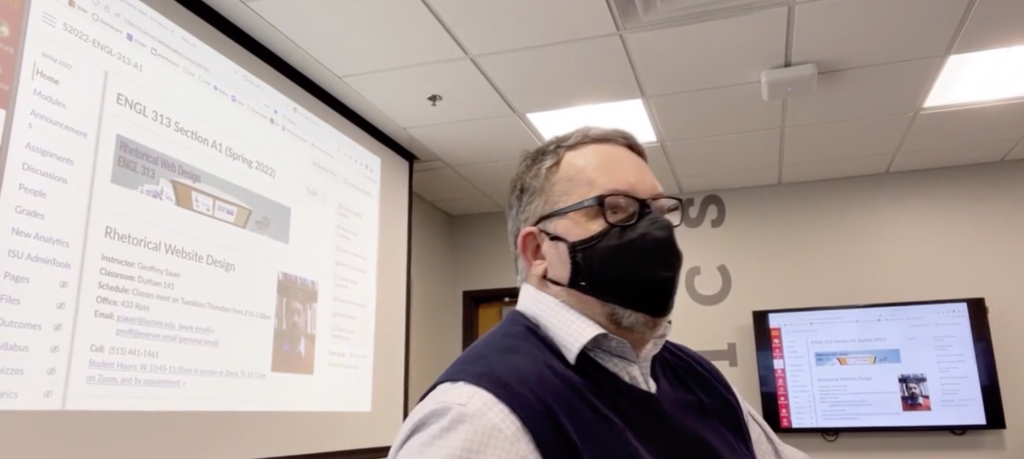
My home online teaching setup, 2020.

This isn’t just my experience. Neil Selwyn in 2009 published ‘The Digital Native—Myth and Reality,’ argues that the popular conception of youth as naturally talented with digital devices is profoundly flawed. Based upon his research at the University of London, Selwyn found that celebratory rhetoric motivated well-intentioned but false-to-fact desires for youth empowerment: ‘The digital native discourse as articulated currently cannot be said to provide an especially accurate or objective account of young people and technology.’ (370)

If students came to rhetoric faculty arguing that they were excellent professional writers because they’ve been making social media posts their entire youth, we’d be skeptical. We would suggest that courses in formal writing would help to discipline, professionalize, and make more sophisticated the sort of composition students can make. That, in fact, is the motivation for so many university general writing requirements.

But our universities often don’t offer corresponding requirements—indeed, we seldom even offer gen-ed courses in multimodal composition that would teach students web writing/production, professional multimedia or photographic editing, or interaction design for online content.

Since their earliest founding, departments of English have focused on teaching students to produce culture. In the past, these have meant teaching students to write poetry, short fiction, novels, and creative nonfiction.

But if I’m right, and online and multimodal content are more and more central to contemporary culture, and students aren’t innately skilled at producing these, then we need to develop systematic and curricular plans to teach these to our students.

Teaching my students how to light 4K video projects. (Don't actually light videos this way.)

Tech Comm Applications

What All Tech Comm Majors Should Learn in College, 2022 Edition

For a few years, I’ve maintained a list of applied technologies which I’ve recommended the students in our undergraduate Bachelor of Science in Technical Communication should learn, while they are still full-time students. It applies, usually less directly for our MA and PhD students as well, though they tend to have fewer courses in applied technologies.

Though not all of these are taught directly within courses in our program (or any I know of), the larger disciplinary perspectives in which these tools are useful are taught, and students can (and I believe should) explore these software/hardware packages whenever possible, as they learn to apply the larger lessons to particular applications. I personally wish more of these were taught directly in courses (though I understand why they aren’t).

This isn’t to say that students shouldn’t read rhetorical theory, or literature, or study grammar and speech communication. I’m a fervent advocate for the humanities. But in 2022 these include digital humanities perspectives, as well. And to be able to create those, students need to learn the tools of modern digital composition. And there are a lot.

So a few of my students last semester suggested that I share this list online, and invite comments or suggestions from colleagues around the world (who may have items to add or edit). So: here’s my 2022 list. I’ll look forward to any comments you may have!

Categories

  • Accessibility (Web Developer Tools, JAWS/VoiceOver, SiteImprove, Dragon, Dictate)
  • Backups (Time Machine, rsync, Git)
  • Data Analytics/Visualization (MS Excel, D3.js, Chart.js, JMP, R, R Studio, SPSS)
  • Digital Audio Editing (Audacity, Audition)
  • Digital Photography (Photoshop, Lightroom, GiMP)
  • Digital Video Recording (DaVinci Resolve, Premiere Rush, Premiere Pro)
  • Flowchart Software (Visio, OmniGraffle, Google Drawings)
  • Page Layout/Document Design (Acrobat, InDesign, Scribus, FrameMaker, DITA Open Toolkit)
  • Platforms (Android, iOS, iCloud, Google Drive, OneDrive, MacOS, Windows, Linux, Web Apps)
  • Presentation (MS PowerPoint, Keynote, Google Slides)
  • Project Management (Waterfall/Agile/Scrum Project Management, Git)
  • Structured Documentation (RoboHelp, Madcap Flare, OxygenXML, DITA Open Toolkit)
  • User Experience Design (Adobe XD, Figma, Camtasia, FaceTime, Skype, Webex, Zoom, Trello)
  • Vector Images (Adobe Illustrator, Inkscape, SVG)
  • Web Design (Adobe Dreamweaver, WordPress, HTML, CSS, JavaScript, XML)
  • Web Development (PHP, Python, MySQL/MariaDB, SQLite, XML)
  • Web Libraries (AngularJS, Bootstrap, React, Electron, Xcode, Android SDK)
  • Writing/Collaboration Tools (MS Word 2020, Git/GitHub, Google Docs, Pages, Etherpad)

Desktop Applications

  • Document Design (Adobe Acrobat, Adobe FrameMaker, Adobe InDesign, Fonts)
  • Image Editing (Adobe Illustrator, Adobe Photoshop, GIMP, SVG)
  • Video Editing (Adobe Premiere, Camtasia, DaVinci Resolve)
  • Documentation (Adobe RoboHelp, DITA Open Toolkit, Madcap Flare, oXygen XML)
  • Collaboration (Basecamp, Git, Slack, Webex, Zoom, MS Teams)
  • Web Design (HTML, CSS, JavaScript, PHP, Docker)
  • Word Processing (MS Word, OpenOffice Writer)
  • Software Development (Android SDK, XCode)
  • Data Science (Excel, R, R Studio, D3.is, Python)
  • Responsive Design (Adobe XD, Figma)
  • Presentation (PowerPoint, Prezi)
  • Web Browsers

Web Applications

  • Content Management (WordPress, Drupal, Plone, Confluence, Wikimedia)
  • Learning Management (Canvas, Moodle)
  • MRDS (MySQL, MariaDB)
  • User Surveying (LimeSurvey, SurveyMonkey)
  • Web Analytics (Matomo, Google Analytics)
  • Search (Solr)
  • Data Science (Jupyter Lab, R, Grafana)
  • Virtual Desktops (KASM)
  • Social Media (Mastodon, Facebook, Twitter, Instagram, BuddyPress)
  • Multimedia (PeerTube, Plex, YouTube, ffmpeg)
  • E-Commerce (WooCommerce)
  • E-Libraries (Nextcloud, Kavita, Pyshelf, Paperless-NG, Calibre-web)
  • Collaboration (Etherpad, Google Docs, Office 365, Ethercalc)
  • Project Management (Redmine, Jira, Gitea, Bitbucket, Taiga)

Platforms (Hardware and Software)

  • Apple iCloud/Apps
  • Desktops
  • Google Drive/Apps
  • Laptops
  • Mobile (Android, iOS)
  • OSes (MacOS, Windows, Linux desktop, Linux command line)
  • Docker/Kubernetes
  • Microsoft OneDrive/Office 365 Apps
  • Backup (RAID, rsync, offline backups)
  • USB 3/3.1/3.2/4/Thunderbolt
  • Web Applications/Cloud Apps

Web Libraries

  • AngularJS
  • Bootstrap
  • ElectronJS
  • React

Geoff Sauer is an American professor and new media theorist who researches technologies including open source software and collaborative multimedia development in the context of the history of publishing.

Copyright © 2022-26 by
Geoffrey Sauer. All rights reserved.


QR code